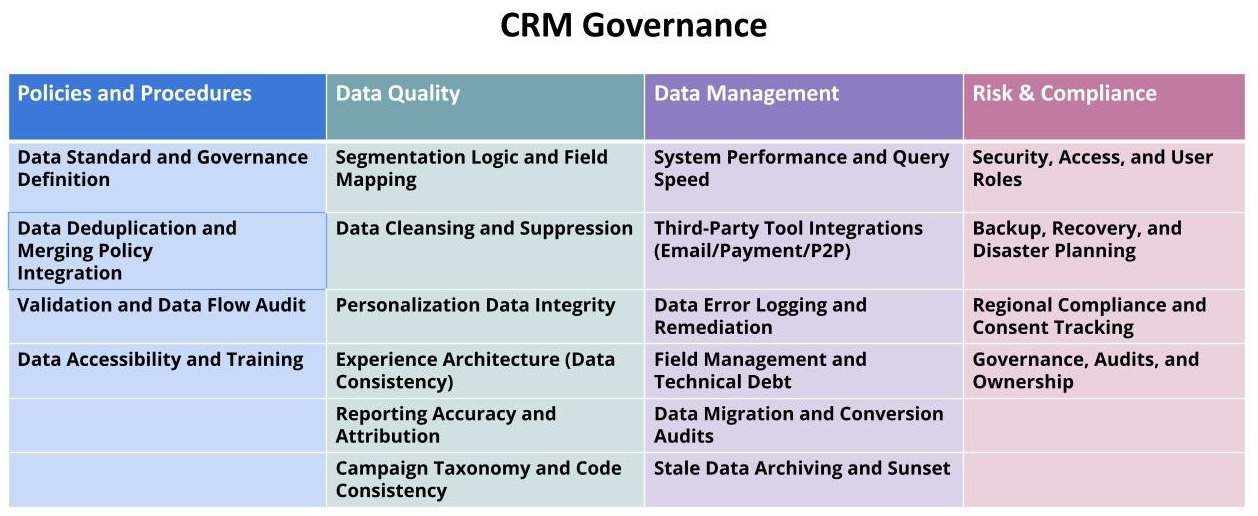
Data Standard and Governance Definition
A healthy CRM starts with documented data standards. Define the expected format, casing (e.g., Proper Case for Names), and picklist values for all critical fields (Name, Address, Date, Campaign Code). Enforce these standards at the point of entry (forms, staff data entry) to prevent data entropy.
Data governance is a policy. Define a clear owner for each major data set (e.g., Development owns Gift Data, Marketing owns Email Consent).
Consider
- Document a formal Data Dictionary that defines every critical field, its source, and required format.
- Implement input masks or validation rules on all entry points (online forms, staff screens) to enforce standards.
- Establish a policy for handling data discrepancies between integrated systems (the “System of Record”).
- Define a clear owner for the accuracy and completeness of key fields (e.g., Address, Consent Status).
Audit checks
- Data Dictionary is current and accessible to all teams.
- Name and Address fields consistently follow a single standard (e.g., Proper Case).
- Required fields are enforced at the point of data entry.
- Owner of the Data Dictionary is defined and available.
Data Deduplication and Merging Policy
Unmerged duplicate records are the single biggest threat to accurate reporting, segmentation, and stewardship. A robust, automated policy for identifying, flagging, and merging duplicates is non-negotiable.
The policy must define the logic (e.g., matching on Email + Last Name vs. Address + Last Name) and the Master Record Rule (which data set wins in a conflict, e.g., the newest record or the record with the most gift history).
Consider
- Implement automated duplicate checking and merging rules based on a defined Master Record policy.
- Audit the automated merge process regularly to ensure correct record consolidation.
- Run a batch merge process on the entire database at least quarterly.
- Define a clear process for staff to report and manually request merging of complex duplicates.
Audit checks
- Automated duplicate rule logic is documented and tested.
- Master Record Rule (which data to keep in a merge) is explicitly defined.
- Duplicates are actively monitored, and the percentage of duplicates is decreasing.
- Manual override/staff merge process is documented and trained.
Integration Validation and Data Flow Audit
The CRM is the hub. Ensure that all spokes (website, email service provider (ESP), finance/general ledger (GL), phone vendors) are accurately and reliably feeding data in and out. Data integrity often fails at the seams between systems.
Audit the two-way data flow: Source System → CRM → Destination System. Verify that every key field (Gift Amount, Email Consent, Campaign Code) is correctly mapped and synchronized in real-time.
Consider
- Map the data flow for the top three critical integrations (e.g., Donation Platform, ESP, GL).
- Verify that transactional data (gifts, event registrations) flows from the source to the CRM in real-time.
- Test that updates in the CRM (e.g., an address change) correctly sync back to the source systems (e.g., Direct Mail vendor).
- Monitor all integration logs for API errors or failed syncs daily.
Audit checks
- Data flow maps are current for all critical integrations.
- Two-way sync is verified for key fields (e.g., Name, Email Status, Last Gift Date).
- Integration error logs are monitored and errors are resolved within 24 hours.
- The “System of Record” is clearly defined for each field in the data flow.
Segmentation Logic and Field Mapping
Accurate segmentation relies on clean and timely data. Audit the fields used for all core segmentation (e.g., Active Donor, Lapsed Donor, Engaged Advocate). Ensure the logic is consistently applied and the underlying data is clean.
Simplify and standardize segmentation fields (e.g., using a simple Status picklist rather than complex calculation fields) to improve performance and reduce staff error.
Consider
- Document the exact, automated criteria for the top 5 most critical segments.
- Ensure segmentation logic is based on clean, normalized fields rather than free-text fields.
- Map all campaign response data to a single, standardized Campaign Code or Source Channel field.
- Test that segment counts are accurate and refresh in real-time or near real-time.
Audit checks
- Automated logic for top 5 segments is documented and verified.
- Segmentation fields are clean, normalized, and updated instantly upon action.
- Campaign response data consistently maps to a standardized taxonomy.
- Segment refresh times meet operational needs (e.g., real-time for urgent appeals).
Data Cleansing and Suppression
Stale, incorrect, or bounced data poisons the well, leading to wasted spend and damaged sender reputation. Aggressively clean and suppress records that are no longer usable.
Implement automated processes for suppressing hard bounces, cleaning invalid address data (NCOA), and flagging known deceased records.
Consider
- Run NCOA (National Change of Address) and deceased screening against the physical address data at least annually.
- Implement a process for instantly suppressing hard-bounced email addresses from all mailing lists.
- Archive or suppress records that have been completely inactive (no opens, no gifts, no actions) for over 3-5 years.
- Use a simple “Data Quality” field to flag records requiring manual cleanup.
Audit checks
- Hard bounces are permanently suppressed from the active file.
- NCOA/Deceased screening has been run within the last 12 months.
- A formal policy for archiving inactive records is documented and executed.
- Address normalization tools are used to standardize physical addresses (e.g., USPS validation).
Personalization Data Integrity
Personalization is only as good as the underlying data. Audit the cleanliness of the most used personalization fields (First Name, Last Gift Amount, City). Errors here lead to an immediate loss of trust.
Ensure fallback logic is in place for any personalization token (e.g., using a default greeting if the First Name field is empty).
Consider
- Run an audit of the First Name field to identify non-names, proper casing issues, or junk data.
- Implement a simple script to clean common casing issues (e.g., JOHN DOE to John Doe).
- Test all personalization tokens used in major communications for correct fallback logic.
- Ensure transactional data (Last Gift Date/Amount) is always accurate and updated instantly upon gift completion.
Audit checks
- Top personalization fields (Name, City) are clean and in the correct case.
- Fallback logic is working for all personalization tokens used in automated journeys.
- Transactional data used for personalization is verified as accurate.
Security, Access, and User Roles
Protecting supporter data is paramount. Audit all user roles, permissions, and access levels to ensure staff only have access to the data necessary for their job function (Principle of Least Privilege).
Ensure strong password policies and multi-factor authentication (MFA) are enforced for all users, especially those with access to financial or personally identifiable information (PII).
Consider
- Document all CRM user roles and the exact permissions associated with each role.
- Enforce Multi-Factor Authentication (MFA) for all system users.
- Implement a regular audit schedule (e.g., quarterly) to review active user accounts and revoke access for termed employees.
- Ensure all access to PII and financial data is logged and restricted to a limited number of users.
Audit checks
- MFA is enforced for all CRM users.
- User roles are explicitly defined and adhere to the Principle of Least Privilege.
- A formal quarterly user access review is documented and executed.
- Audit logs for PII access are reviewed regularly.
Bloated or poorly structured data slows down the system for all users. System performance directly impacts staff productivity and the speed of critical segmentation (which can impact send times).
Audit and optimize the speed of the most critical reports and queries. Remove unnecessary fields and data redundancy.
Consider
- Audit the top 5 slowest reports and optimize the underlying queries.
- Limit the use of complex, calculated fields that slow down database lookups.
- Archive old, non-essential activity and transactional records to reduce the overall database size.
- Ensure database indexes are optimized for the most frequent search and reporting fields.
Audit checks
- Critical reports and segments execute in under the target time (e.g., under 10 seconds).
- Unused or redundant custom fields have been archived or removed.
- Database storage utilization is monitored, and archiving is performed as needed.
Data Accessibility and Training
Data is only valuable if staff can use it. Ensure clear, simple training and documentation are available for all data-related tasks (data entry, running standard reports, managing consent).
Simplify the user interface to reduce confusion and staff errors.
Consider
- Create a simple, documented process for staff to look up a constituent and their key information.
- Develop a short, ongoing training program for staff on data entry standards and reporting basics.
- Consolidate complex fields into simple, dashboard-style views for non-power users.
Audit checks
- Quick-start guides for key data tasks are accessible and up-to-date.
- All staff are trained on the documented Data Standards.
- The CRM user interface is configured for maximum usability and minimal clutter.
Backup, Recovery, and Disaster Planning
Data integrity also means data security. Maintain a clear, documented process for system backup and disaster recovery.
Ensure the backup cadence meets organizational risk tolerance and that a test recovery process has been run within the last year.
Consider
- Document the exact backup cadence (e.g., daily, full nightly) and off-site storage location.
- Define and document a formal Disaster Recovery Plan (DRP) with clear RTO (Recovery Time Objective) and RPO (Recovery Point Objective).
- Test the ability to restore a segment of the database from backup at least annually.
Audit checks
- Backup cadence and off-site storage are documented and verified.
- DRP is documented, approved, and includes clear RTO/RPO.
- A test restoration from backup has been performed within the last 12 months.
Every third-party tool that collects data must have a reliable, mapped, and audited integration with the CRM. Data silos are the result of broken or non-existent integrations.
Ensure that P2P platforms, volunteer portals, and event tools accurately pass donor/supporter IDs to prevent the creation of duplicate records.
Consider
- Map every field collected by third-party tools back to a specific, standardized CRM field.
- Verify that the third-party tool’s unique identifier (e.g., external ID) is mapped and stored in the CRM for matching.
- Conduct a full end-to-end transaction test for every critical third-party integration at least quarterly.
Audit checks
- All third-party data collection tools are integrated and mapped.
- Unique Supporter/Constituent ID is passed and validated between systems.
- Integration health checks are performed quarterly.
Experience Architecture (Data Consistency)
The supporter’s experience is shaped by your data consistency. They should never see a different First Name on an email versus a direct mail piece. Ensure the System of Record is consistently used across all channels.
Audit the fields that flow out for communications to ensure they are the same version of the truth.
Consider
- Define the “Source of Truth” for Name, Address, and Email Consent, and enforce it for all outbound communications.
- Use a single, normalized field (e.g., Display Name) for all external communications.
Audit checks
- Outbound communication fields are sourced from the defined System of Record.
- Data inconsistency between channels is minimal (e.g., less than 1% discrepancy in Name).
Define and utilize the CRM’s error logging functionality. Ensure that all integration failures, validation errors, and bulk update failures are logged, reviewed, and remediated in a timely manner.
The system should alert the appropriate owner when critical data flow errors occur.
Consider
- Configure automated alerts for critical integration failures (e.g., payment sync failure).
- Document the process and tools used to clean and re-import failed records.
- Prioritize remediation based on data criticality (e.g., Gift Data errors before Newsletter Consent errors).
Audit checks
- Critical data error logs are reviewed daily.
- Remediation protocol is documented and assigned to a clear owner.
Reporting Accuracy and Attribution
Accurate reporting relies on a clean data foundation. Audit the fields used for financial and campaign attribution (e.g., Campaign Code, Source Channel).
Ensure that all reports (digital, direct mail, major gift) pull from the same, clean data definitions to prevent conflicting numbers.
Consider
- Audit the top 5 financial/revenue reports for correct data source and calculation logic.
- Ensure all attribution fields (e.g., UTM, Appeal Code) are normalized before being used in reporting.
- Validate that aggregated revenue reports match the GL system on a quarterly basis.
Audit checks
- Top financial reports are validated for accuracy against the GL.
- Attribution fields are normalized and consistently used across all reports.
- Reporting is audited for conflicting data points (e.g., Total Donor Count).
Field Management and Technical Debt
Every custom field adds complexity, maintenance overhead, and technical debt. Audit all custom fields annually. Archive or delete unused fields to reduce system complexity and improve query performance.
Consider
- Archive or delete any custom field that has not been populated or used in a report for over 12 months.
- Document the purpose of every remaining custom field and its designated owner.
- When creating a new field, first check if an existing, similar field can be repurposed.
Audit checks
- Technical debt audit of custom fields is performed annually.
- Unused custom fields are archived/deleted.
- All remaining custom fields have a documented purpose and owner.
Data Migration and Conversion Audits
If a data migration occurred recently, or if a major new module was launched, conduct a Post-Launch Audit. Verify that data was successfully converted and that legacy fields were correctly mapped to new fields.
Consider
- Audit a statistically significant sample of records post-migration for data fidelity.
- Verify that historical transaction data was correctly converted and attributed.
Audit checks
- Post-migration data fidelity audit is documented.
- Historical gift and activity data is confirmed as accurate and complete.
Stale Data Archiving and Sunset
Beyond the active suppression of bad data, define a policy for archiving or sunsetting old activity data that is no longer used for segmentation or reporting. This improves system performance and query speed.
Consider
- Archive activity/transaction records older than a defined period (e.g., 7-10 years).
- Ensure that archived data remains accessible for historical financial audits.
Audit checks
- Archiving policy is documented and executed regularly.
- Archived data is accessible but removed from active queries.
Campaign Taxonomy and Code Consistency
All campaign identifiers (Appeal Codes, UTMs, Source Codes) must follow a single, logical, and consistent taxonomy. Inconsistent codes break attribution and segment accuracy.
Consider
- Document a formal taxonomy standard for all campaign identifiers.
- Implement a process for vetting and approving new campaign codes to ensure compliance with the standard.
Audit checks
- Campaign taxonomy standard is documented and enforced.
- All new campaigns follow the documented code standard.
Regional Compliance and Consent Tracking
The CRM is the System of Record for consent. Ensure all opt-in/opt-out statuses and regional compliance fields (e.g., GDPR consent type) are accurately captured, stored, and respected by all integrated communication systems.
Consider
- Verify that all opt-out/unsubscribe requests are stored immediately and accurately in the CRM.
- Ensure explicit consent fields are present for regions requiring them (e.g., EU, Canada).
Audit checks
- Consent fields are accurately mapped from all sources and stored in the CRM.
- Regional compliance rules are implemented and respected by the ESP.
Governance, Audits, and Ownership
Great data stays great when someone owns it. Assign stewardship for data standards, deduplication, security, and integration health. Put a Quarterly Data Health Audit on the calendar.
This audit must review all governance areas and verify data consistency across all systems.
Consider
- Define owners for Data Governance, Data Security, and Integration Health.
- Maintain a transparent log of all data structure changes.
- Schedule quarterly reviews to check for deduplication backlog, integration errors, and data standard compliance.
Audit checks
- Owners named and reachable.
- Quarterly Data Health Audit cadence on the calendar.
- All data structure changes are logged and approved.